Showing posts with label How To. Show all posts

Wednesday, April 22, 2009

Quick Product Create, blessing and curse

The advent of Quick Product Create in the Zazzle marketplace has caused some consternation in long-time Zazzle users, and it's easy to see why. Unlike Cafepress, where you put your design on anything and everything, in Zazzle the philosophy and site structure works best to show a design on one thing then allow customers to customize. What's too often happening with Quick Product Creat (QPC) is the same design is slapped on everything available in the Zazzle marketplace, regardless of whether it fits well. Then searches clog up as people have to scroll by page after page of the same design to be able to see what other designs might be available. It can be a nightmare.

Fortunately, there's a way to use QPC responsibly so your designs are highlighted and your work is at least somewhat streamlined. Here's how I handle it for the DDGraphix site.

First, I made a set of templates. I did that by creating templates in Quick Product Create using the guidelines in the Zazzle seller blog. Don't worry, it's easy.

The very first thing to do is set yourself up a "Templates" section. Under "Products," click on "Add New Product Line." I actually put my "Templates" section under "New Products," but put yours wherever it makes sense to you.

I used "all products" to set up my initial set of template items. Then, before even completing the template process, I went through and slimmed that offering down. I went with one male model, one female model, and one child model. I left in a magnet, button, and key chain but just one of each. I also left in vertical and horizontal stamps and vertical and horizontal cards. I ditched neckties, it's not something I'll use. Obviously your own choices may differ, but think of trying to distill to one of each orientation of paper products and one of each type of model for clothing, etc.

That becomes my main template for all new items I want to use Quick Create on. I'm now ready to actually put a design on many products. When deciding whether to use Quick Create, I first make sure that it's appropriate to put the same categories, description and tags on all the items. If I need to do special tags and descriptions for each item then QPC isn't the right thing to do.

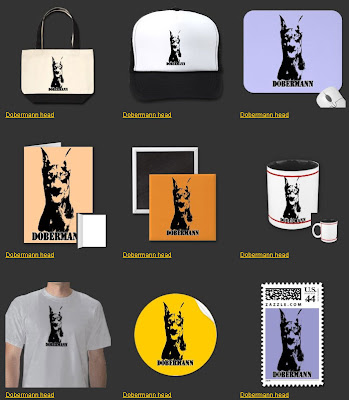
Once the main design is loaded and you hit to create products, your real work begins. Because if you want your design to be successful, you need to be prepared to prune your offerings and modify the ones left. Let's take this Doberman design. The main design is just a black and white Doberman head. It's vertical, so the first thing I did was toss out the horizontal stamps, cards, etc. that QPC had pulled from my template. Then I went into the Customize feature on each item. I worked on size, added some background colors, etc. My goal is to show my potential buyers how good the design looks in a variety of products but not overwhelm them with pages and pages.
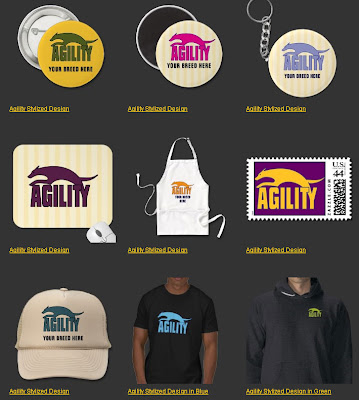
Another great use of QPC is to highlight a design you have available in several color combinations. In the case of this stylized agility design, I did it in many colors. I want to display different colors on different products, and in the description I will be sure to mention that it can be available on ANY product in any color.


If you put your quality time into this main section of QPC, it will reap you huge benefits. You can then move to the best feature of QPC, the ability to assign a description, category and tags to a number of different items all at once. Be careful in your description and don't be afraid to add extra info. I always point out that shirt styles can be changed for instance.

QPC really can be useful, but it should be used with understanding and respect. Don't spam your site with lots of products, but do use QPC to apply a design thoughtfully to a smaller subset of products.

Wednesday, March 18, 2009

A discussion of copyright

On the Zazzle forums, we often get a lot of questions about copyright. Unfortunately most of the time those questions come after someone has had a design or designs pulled by Zazzle for copyright violation.

It must be frustrating to put a product up, only to see it disappear. However, copyright is the law. And even though not everyone contributing designs to the Zazzle marketplace is from the U.S., because Zazzle is located in the States, their User Agreement is based on U.S. copyright law. Zazzle's User Agreement also prohibits things such as copying slogans, quotes, or trademarks without express permission. The complete User Agreement is here: http://www.zazzle.com/mk/policy/user_agreement and everyone should read it. Slowly. With comprehension in mind. It's very important.

The basics of copyright are very simple. If someone else created it, you can't steal it. If you created it, nobody else can steal it. So the best way to avoid copyright violations is to only use your own original creations.

What constitutes "creation?" Well, the words I am writing on this blog are mine. I own them. You who are reading this blog cannot copy or paste my words onto your own blog without my permission. That's stealing. You may link to my words here, but you can't take them. If I take a photo, write an essay, draw a design, make up a slogan, all that is mine. If you take my photo and make a drawing from it without my permission, you're stealing, because you're using MY artistic inspiration for your work. If my artistic inspiration was not there, your work also would not exist. That's called derivative artwork, and derivitaves ARE covered by copyright law.

And here's a really important thing. If something appears on the internet is it NOT free for the taking. Designs, photos, and writings posted to the internet are just as much covered by copyright law as anything else.

It's worth the time to pursue the basics of copyright at the copyright.gov site.

So what do you do if you want to sell things on Zazzle but you aren't an artist?

There are several routes you can take. There are some free clipart resources available, some posted to Zazzle. But, this is very important, you MUST review their terms of use. Many royalty-free clipart vendors allow a single use but do not allow multiple uses and never allow an image to be used on items for sale. You can also go out and take your own photos. Or, if you find a photo you love that you'd like to make into an item, ask for permission. Often photographers are amenable to that if you just ask. But keep in mind that if the photo shows a person, that person's permission should also be given.

I do a lot of dog design, and some of my items are photo-based. In each case, I got specific permission from the photographer to use the photo. Many of my items are not able to be identified as a certain dog, but in the case where it is, I often try to get owner permission too though it's not required. The photographer owns the copyright, not the person (or dog!) in the photo.

Another option is to just use the suite of fonts available at Zazzle and make up some fun original sayings.

But whatever you do, do NOT steal work from others for your own profit. It's more than against the law, it's tacky and rude.

Remember that copyright also protects YOUR work. When thinking about this, put the shoe on the other foot. How would you feel if you spent hours of your time and energy coming up with a great design to sell on Zazzle. Then, a month or so later, you found that somebody else had stolen it and was using it on *their* site to sell shirts. They were making money off your work and you were getting nothing. Me, I bet you'd be pretty mad about that. I know I would.